Node-RED中将CSV数据写入txt文件并从文件中读取解析数据
本文共 9735 字,大约阅读时间需要 32 分钟。
场景
Node-RED简介与Windows上安装、启动和运行示例:
Node-RED怎样导出导入流程为json文件:
CSV的内容是使用纯文字方式表示的表格资料,第一行是表格的标题,每一列用,隔开。
例如:
Name,height,weight
Joe,170,70 Mary,160,49怎样将数据存储到txt文件中,需要时从文件中读取并解析获取数据。
注:
博客:
关注公众号 霸道的程序猿 获取编程相关电子书、教程推送与免费下载。实现
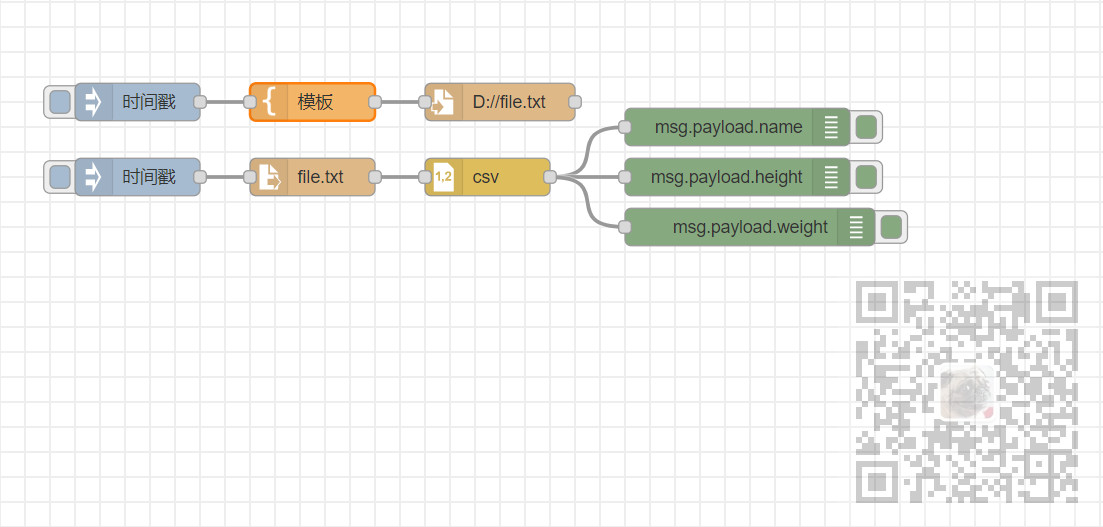
1、页面布局
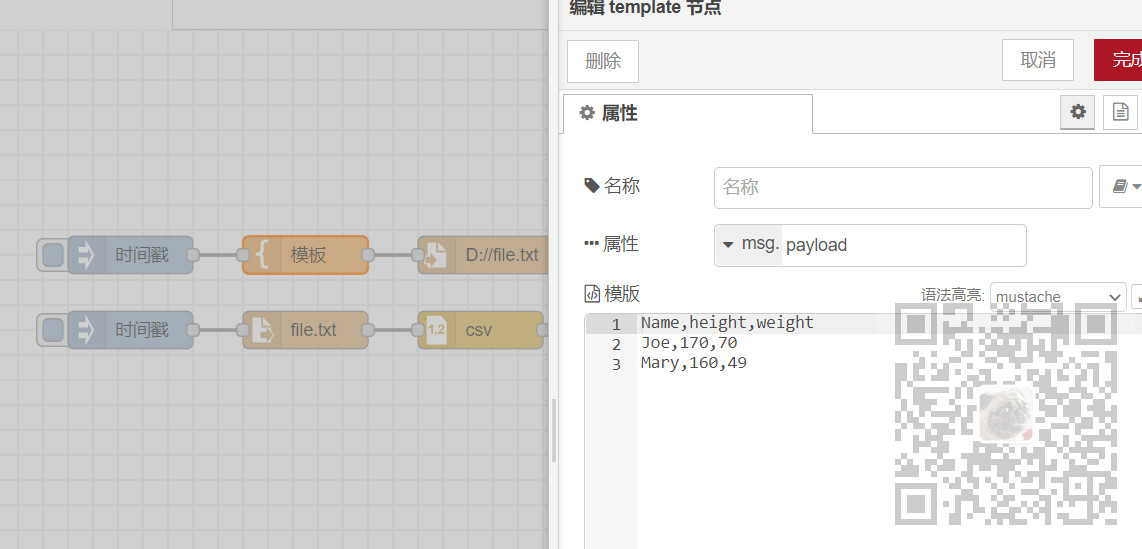
2、template节点,输入csv资料
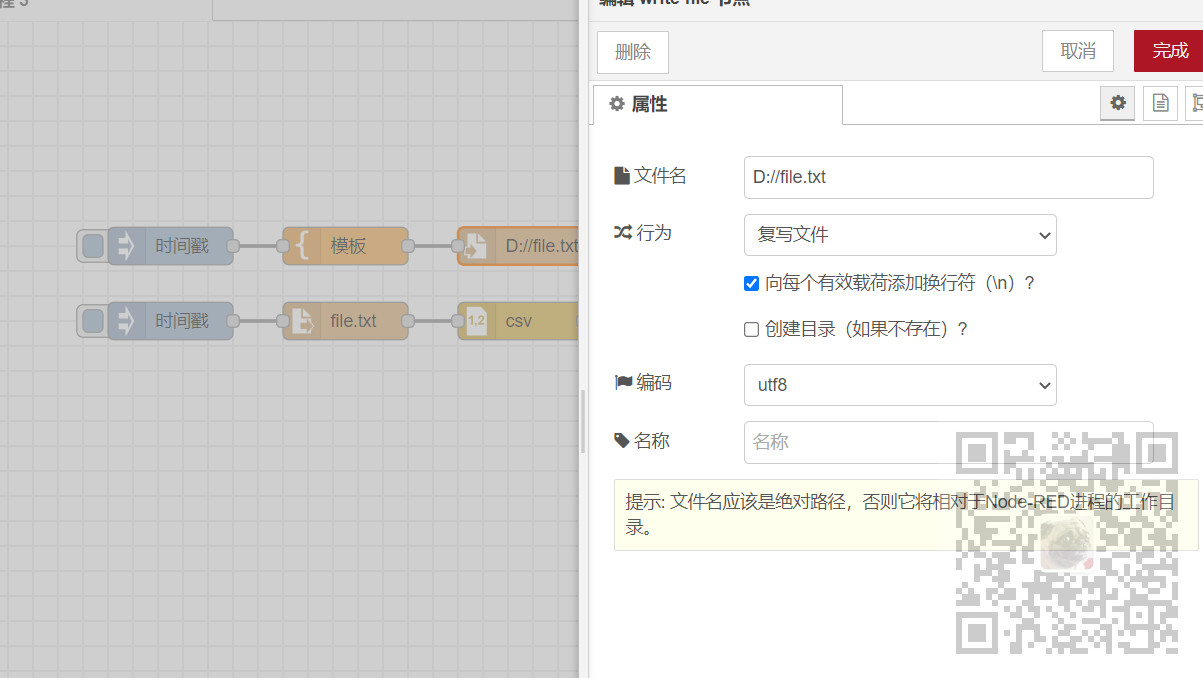
3、file节点,将csv资料用utf-8编码写入D://file.txt
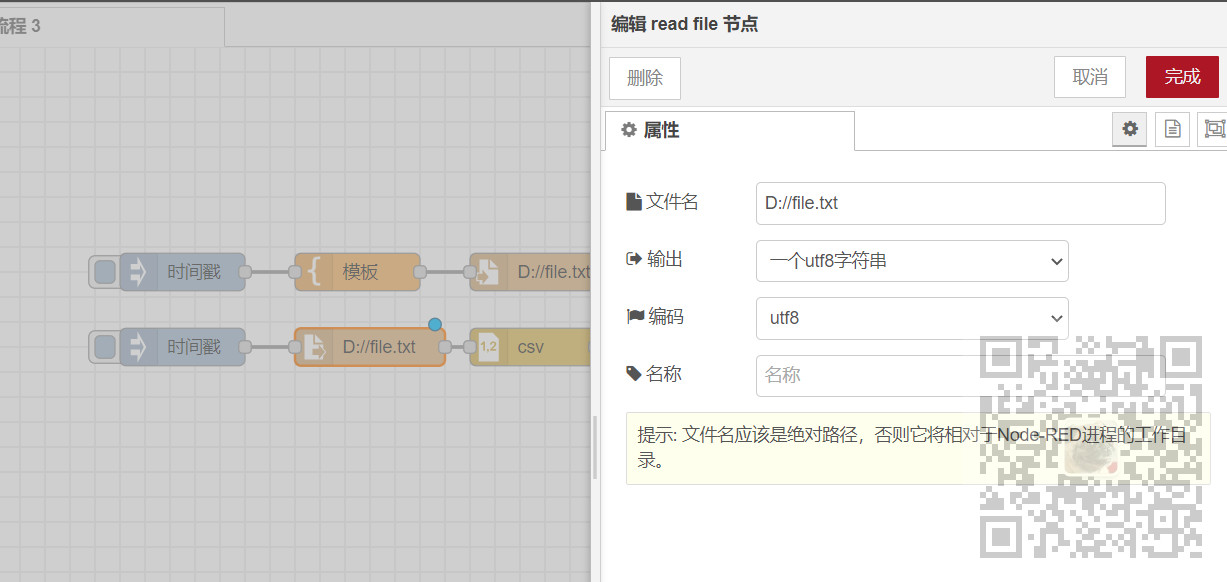
4、file in节点,读取file.txt,输出utf-8的一个字符
5、csv节点,剖析csv资料,输入列名,分隔符是逗号,因为第一列是标题列,所以在输入时忽略第一行
输出时选择每行一条信息
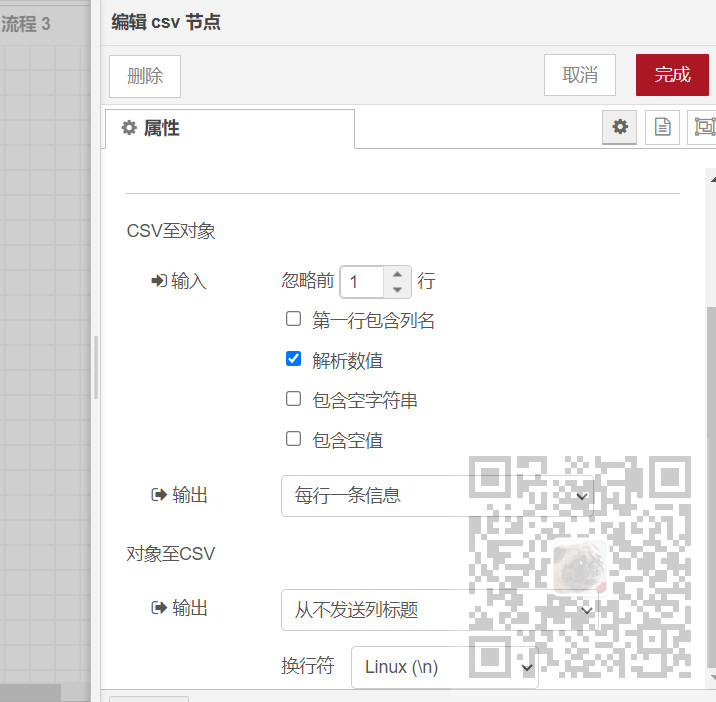
6、解析效果
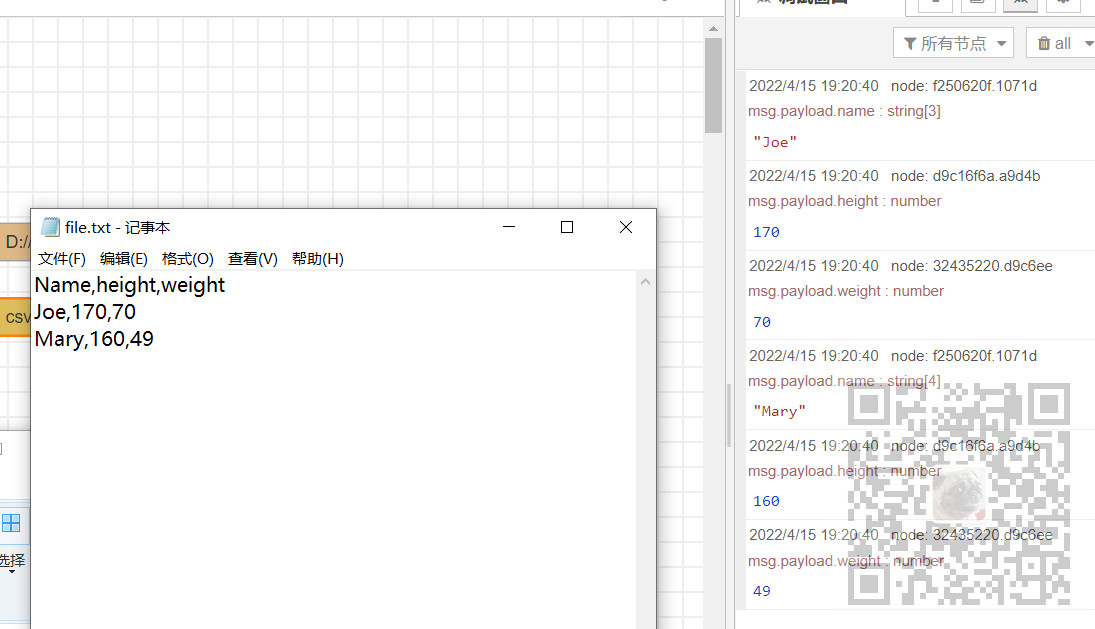
7、json数据
[ { "id": "f4a4d8eab7935bc8", "type": "tab", "label": "流程 3", "disabled": false, "info": "", "env": [] }, { "id": "c428312d1f6165d1", "type": "mqtt-broker", "name": "mqtt", "broker": "127.0.0.1", "port": "1883", "clientid": "", "autoConnect": true, "usetls": false, "protocolVersion": "4", "keepalive": "60", "cleansession": true, "birthTopic": "", "birthQos": "0", "birthPayload": "", "birthMsg": {}, "closeTopic": "", "closeQos": "0", "closePayload": "", "closeMsg": {}, "willTopic": "", "willQos": "0", "willPayload": "", "willMsg": {}, "sessionExpiry": "" }, { "id": "51eee50b4ec9422f", "type": "ui_group", "name": "dashboardDemo", "tab": "29ae4c620f43ee0d", "order": 1, "disp": true, "width": "6", "collapse": false, "className": "" }, { "id": "29ae4c620f43ee0d", "type": "ui_tab", "name": "Home", "icon": "dashboard", "disabled": false, "hidden": false }, { "id": "a506c767a5c1edbd", "type": "ui_base", "theme": { "name": "theme-light", "lightTheme": { "default": "#0094CE", "baseColor": "#0094CE", "baseFont": "-apple-system,BlinkMacSystemFont,Segoe UI,Roboto,Oxygen-Sans,Ubuntu,Cantarell,Helvetica Neue,sans-serif", "edited": true, "reset": false }, "darkTheme": { "default": "#097479", "baseColor": "#097479", "baseFont": "-apple-system,BlinkMacSystemFont,Segoe UI,Roboto,Oxygen-Sans,Ubuntu,Cantarell,Helvetica Neue,sans-serif", "edited": false }, "customTheme": { "name": "Untitled Theme 1", "default": "#4B7930", "baseColor": "#4B7930", "baseFont": "-apple-system,BlinkMacSystemFont,Segoe UI,Roboto,Oxygen-Sans,Ubuntu,Cantarell,Helvetica Neue,sans-serif" }, "themeState": { "base-color": { "default": "#0094CE", "value": "#0094CE", "edited": false }, "page-titlebar-backgroundColor": { "value": "#0094CE", "edited": false }, "page-backgroundColor": { "value": "#fafafa", "edited": false }, "page-sidebar-backgroundColor": { "value": "#ffffff", "edited": false }, "group-textColor": { "value": "#1bbfff", "edited": false }, "group-borderColor": { "value": "#ffffff", "edited": false }, "group-backgroundColor": { "value": "#ffffff", "edited": false }, "widget-textColor": { "value": "#111111", "edited": false }, "widget-backgroundColor": { "value": "#0094ce", "edited": false }, "widget-borderColor": { "value": "#ffffff", "edited": false }, "base-font": { "value": "-apple-system,BlinkMacSystemFont,Segoe UI,Roboto,Oxygen-Sans,Ubuntu,Cantarell,Helvetica Neue,sans-serif" } }, "angularTheme": { "primary": "indigo", "accents": "blue", "warn": "red", "background": "grey", "palette": "light" } }, "site": { "name": "Node-RED Dashboard", "hideToolbar": "false", "allowSwipe": "false", "lockMenu": "false", "allowTempTheme": "true", "dateFormat": "DD/MM/YYYY", "sizes": { "sx": 48, "sy": 48, "gx": 6, "gy": 6, "cx": 6, "cy": 6, "px": 0, "py": 0 } } }, { "id": "248cbbb0.18e794", "type": "ui_group", "name": "MyGroup", "tab": "3f79c420.cfc1bc", "order": 1, "disp": true, "width": "6", "collapse": false }, { "id": "3f79c420.cfc1bc", "type": "ui_tab", "name": "Home", "icon": "dashboard", "disabled": false, "hidden": false }, { "id": "a0954be5.a7f7e8", "type": "ui_group", "name": "MyInput", "tab": "3f79c420.cfc1bc", "order": 2, "disp": true, "width": "6", "collapse": false }, { "id": "508bd6f8398ab80f", "type": "ui_group", "name": "OpenWeatherMap", "tab": "3f79c420.cfc1bc", "order": 3, "disp": true, "width": "6", "collapse": false }, { "id": "8824dea1.83e31", "type": "websocket-client", "path": "ws://localhost:9898/", "tls": "", "wholemsg": "false" }, { "id": "f9c23ff5.026e", "type": "file", "z": "f4a4d8eab7935bc8", "name": "", "filename": "D://file.txt", "appendNewline": true, "createDir": false, "overwriteFile": "true", "encoding": "utf8", "x": 480, "y": 180, "wires": [ [] ] }, { "id": "2ebfe992.fdc746", "type": "inject", "z": "f4a4d8eab7935bc8", "name": "", "repeat": "", "crontab": "", "once": false, "onceDelay": 0.1, "topic": "", "payload": "", "payloadType": "date", "x": 190, "y": 240, "wires": [ [ "cfaafb8.012a108" ] ] }, { "id": "cfaafb8.012a108", "type": "file in", "z": "f4a4d8eab7935bc8", "name": "", "filename": "D://file.txt", "format": "utf8", "chunk": false, "sendError": false, "encoding": "utf8", "allProps": false, "x": 340, "y": 240, "wires": [ [ "ee4f2b44.0fc328" ] ] }, { "id": "32435220.d9c6ee", "type": "debug", "z": "f4a4d8eab7935bc8", "name": "", "active": true, "tosidebar": true, "console": false, "tostatus": false, "complete": "payload.weight", "targetType": "msg", "statusVal": "", "statusType": "auto", "x": 680, "y": 280, "wires": [] }, { "id": "ee4f2b44.0fc328", "type": "csv", "z": "f4a4d8eab7935bc8", "name": "", "sep": ",", "hdrin": "", "hdrout": "none", "multi": "one", "ret": "\\n", "temp": "name,height,weight", "skip": "1", "strings": true, "include_empty_strings": "", "include_null_values": "", "x": 470, "y": 240, "wires": [ [ "f250620f.1071d", "d9c16f6a.a9d4b", "32435220.d9c6ee" ] ] }, { "id": "f250620f.1071d", "type": "debug", "z": "f4a4d8eab7935bc8", "name": "", "active": true, "tosidebar": true, "console": false, "tostatus": false, "complete": "payload.name", "targetType": "msg", "statusVal": "", "statusType": "auto", "x": 670, "y": 200, "wires": [] }, { "id": "d9c16f6a.a9d4b", "type": "debug", "z": "f4a4d8eab7935bc8", "name": "", "active": true, "tosidebar": true, "console": false, "tostatus": false, "complete": "payload.height", "targetType": "msg", "statusVal": "", "statusType": "auto", "x": 670, "y": 240, "wires": [] }, { "id": "277f6cb6.89e434", "type": "template", "z": "f4a4d8eab7935bc8", "name": "", "field": "payload", "fieldType": "msg", "format": "handlebars", "syntax": "mustache", "template": "Name,height,weight\nJoe,170,70\nMary,160,49", "output": "str", "x": 330, "y": 180, "wires": [ [ "f9c23ff5.026e" ] ] }, { "id": "f22a93b5.26844", "type": "inject", "z": "f4a4d8eab7935bc8", "name": "", "props": [ { "p": "payload" }, { "p": "topic", "vt": "str" } ], "repeat": "", "crontab": "", "once": false, "onceDelay": 0.1, "topic": "", "payloadType": "date", "x": 190, "y": 180, "wires": [ [ "277f6cb6.89e434" ] ] }] 转载地址:http://qijfk.baihongyu.com/
你可能感兴趣的文章
Nginx映射本地json文件,配置解决浏览器跨域问题,提供前端get请求模拟数据
查看>>
nginx最最最详细教程来了
查看>>
Nginx服务器---正向代理
查看>>
Nginx服务器上安装SSL证书
查看>>
Nginx服务器基本配置
查看>>
Nginx服务器的安装
查看>>
Nginx标准配置文件(包括反向代理、大文件上传、Https证书配置、文件预览等)
查看>>
Nginx模块 ngx_http_limit_conn_module 限制连接数
查看>>
Nginx模块 ngx_http_limit_req_module 限制请求速率
查看>>
nginx添加模块与https支持
查看>>
nginx状态监控
查看>>
Nginx用户认证
查看>>
Nginx的location匹配规则的关键问题详解
查看>>
Nginx的Rewrite正则表达式,匹配非某单词
查看>>
Nginx的使用总结(一)
查看>>
Nginx的使用总结(三)
查看>>
Nginx的使用总结(二)
查看>>
Nginx的使用总结(四)
查看>>
Nginx的可视化神器nginx-gui的下载配置和使用
查看>>
nginx的平滑升级方法:
查看>>